HTTP.PATCH
Create an HTTP PATCH request. Partially modify the specified resource on the server. It is faster and requires less resources than the PUT method.
Syntax
=HTTP.PATCH(URL, [Body], [HeadersJSON], [ConfigJSON], [Target])
Arguments
| Name | Description |
|---|---|
| URL | The URL to request. |
| Body (optional) | The body of the request. |
| HeadersJSON (optional) | Headers of the HTTP request. |
| ConfigJSON (optional) | A JSON configuration for the HTTP request. Possible configurations are: "baseURL","timeout","auth: { username: 'secret', password: 'tops3cret' }","proxy: {protocol: 'https',host: '127.0.0.1',port: 9000, auth: {username: 'secret', password: 'tops3cret' } " |
| Target (optional) | INBOX(), OUTBOX("MsgID") or a cell range where the result will be placed. Make sure the cell range is big enough or not everything is displayed. |
Return
The function HTTP.PATCH() always returns a unique random request ID. Otherwise an error is displayed.
Examples
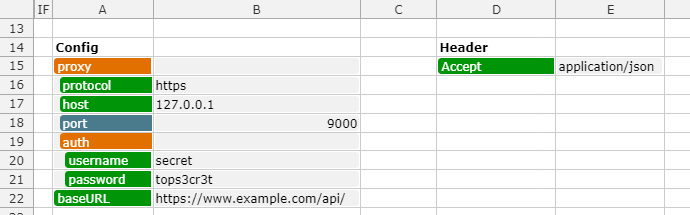
Examples for using the config and header parameter. Use a JSON() function around the cell range.